

这时候我 … 阅读全文
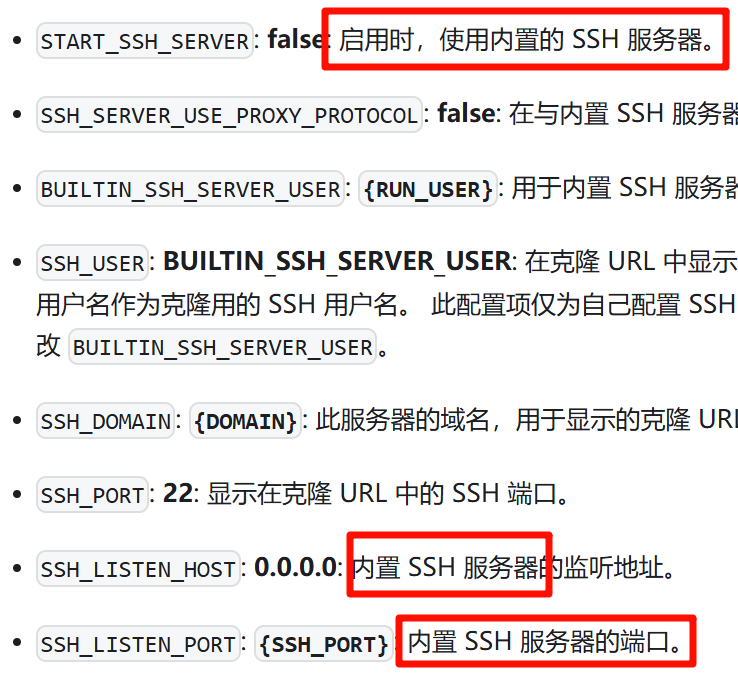
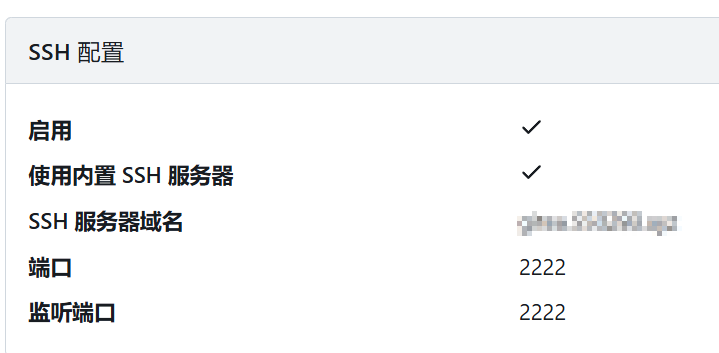
这时候我们就可以用 2222 端口来访问 Gitea 的 SSH 了。
将 Gitea 的容器网络改为 host,看看主机端的端口占用:
root@portainer:~# lsof -i :3000
lsof: no pwd entry for UID 1000
lsof: no pwd entry for UID 1000
COMMAND    PID     USER FD   TYPE  DEVICE SIZE/OFF NODE NAME
caddy       73    caddy 31u  IPv4 2466222      0t0  TCP 10.0.0.108:50484->10.0.0.108:3000 (ESTABLISHED)
lsof: no pwd entry for UID 1000
gitea   417432     1000 14u  IPv6 2443032      0t0  TCP *:3000 (LISTEN)
lsof: no pwd entry for UID 1000
gitea   417432     1000 15u  IPv6 2466223      0t0  TCP 10.0.0.108:3000->10.0.0.108:50484 (ESTABLISHED)
root@portainer:~# lsof -i :2222
lsof: no pwd entry for UID 1000
COMMAND    PID     USER FD   TYPE  DEVICE SIZE/OFF NODE NAME
lsof: no pwd entry for UID 1000
gitea   417432     1000 13u  IPv6 2443026      0t0  TCP *:2222 (LISTEN)
然后尝试拉一个仓库,功能应该正常。
但此时发现一个问题,gitea 容器进程依然在尝试启动 22 端口。
gitea  | 2026/03/02 01:51:03 HTTPRequest [I] router: polling   GET /user/events for [2409:8961:319f:549e:31c3:4abc:30c6:f1cc]:8385, elapsed 3962.1ms @ events/events.go:18(events.Events)
gitea  | Bind to port 22 on :: failed: Address in use.
gitea  | Bind to port 22 on 0.0.0.0 failed: Address in use.
gitea  | Cannot bind any address.
gitea  | Bind to port 22 on :: failed: Address in use.
gitea  | Bind to port 22 on 0.0.0.0 failed: Address in use.
gitea  | Cannot bind any address.
这是因为容器内的 s6 管理软件仍然会根据配置 /etc/ssh/sshd_config 来启动 sshd 服务的原因。从该文件可以看到,SSH 端口依然是 22 端口。
containers:/etc/ssh# head -n 2 /etc/ssh/sshd_config
Port 22
Protocol 2
并且,这份文件不能直接进行更改,因为这些配置文件是容器启动时 s6 刚生成的,改了也没有用。所以我们看看 s6 生成配置的依据是什么?
关键点在这儿:
containers:/etc/s6/openssh# ls
event      finish     run        setup      supervise
containers:/etc/s6/openssh# cat setup
......
if [ -d /etc/ssh ]; then
    SSH_PORT=${SSH_PORT:-"22"} \
......
可以看到,SSH 端口是由环境变量 SSH_PORT 设定的,因此,我们在 docker-compose.yml 中设置一个环境变量就可以了。
environment:
  # 系统 SSH 的端口,host 网络注意不要与内置 SSH 端口、宿主机端口冲突(22 就冲突了)
  - SSH_PORT=2223
重启构建容器 docker compose up -d,logs 不会再有端口占用错误,更改端口后的 SSH 也能正常使用。
方法三:默认 SSH 修改端口
这个方法是从方法二中提炼出来的。因为我想到既然系统 SSH 的端口由环境变量指定,那我直接修改系统 SSH 端口不就可以了吗?
于是禁用了内置 SSH 服务器:
DISABLE_SSH = false
SSH_PORT = 2222
SSH_LISTEN_PORT = 2222
然后,直接添加环境变量
environment:
  # 系统 SSH 的端口
  - SSH_PORT=2222
然后发现就可以使用 2222 端口访问 gitea 的 SSH 服务了,非常简单。 收起